Some of my friends argue that spending a few hundred dollars on a dog bed that more closely resembles a bounce-less trampoline is a poor use of money. Those friends are wrong and are no longer my friends.
But if you twist my arm, I can get where they're coming from: it's a poor use of money to them. They don't have dogs, after all. (Another reason why they're no longer my friends.)
The same logic applies to answering this question: Is a $200/month subscription for ChatGPT Pro worth it?
It probably isn't worth it for most users (you can likely get by with ChatGPT Plus for $20/month). But that doesn't mean ChatGPT Pro isn't worth it for some people. Let me explain.
Table of contents:
What is ChatGPT Pro?
ChatGPT Pro is the $200/month ChatGPT plan aimed at power users who frequently run up against the limits of ChatGPT Plus. (And yes, that's a two with two zeros.)
It's designed for people who depend on ChatGPT for heavy-lift work—like complex reasoning, large-scale coding projects, or research-grade analysis—and need fewer guardrails getting in the way.
ChatGPT Pro features
If you're not sure whether you need a ChatGPT Pro subscription, you almost certainly don't. But here's what you get that might tip the scales.
Unlimited access to the newest models
ChatGPT Plus gives you access to most of OpenAI's newest models, but with usage caps. Once you hit the limit, your chats fall back to a mini version of the model until the window resets. That's fine for casual use. But if you rely on ChatGPT to solve incredibly complicated math or coding problems, you'll probably come up against those limits pretty quickly.
With ChatGPT Pro, you get unlimited access to the latest models, as long as it doesn't violate OpenAI's usage policy.
More control over model thinking time
OpenAI's reasoning model takes time to reason through multi-step problems—the thinking being that the more compute time it uses, the better its results.
When ChatGPT's running on this model via the web app (not desktop or mobile), you'll see a thinking-time toggle in the message composer that lets you decide how much reasoning power to apply:
Standard: Good for balancing speed and intelligence (this is the default)
Extended: Allows more time for harder problems
With a Pro subscription, you unlock two additional levels:
Light: Generates quicker answers that still balance speed and intelligence (this is the fastest option)
Heavy: Applies the deepest reasoning available
Once you set your model's thinking time, your preferences are saved for future queries made via the web app until you switch again.
A larger context window with all models

The context window is the number of tokens a large language model (LLM) can process at once. Basically, how much information it can remember at a time. It includes the input, output, resources, and any system instructions. The larger the context window, the longer the documents you can upload, and the larger the problems you can solve can be. It's particularly relevant if you're working on complex coding projects or using ChatGPT to analyze large text documents.
Plus subscribers get a 32K-token context window, which is plenty for most everyday tasks. But if you're working on a large codebase, analyzing a lengthy contract, or asking ChatGPT to synthesize a 50-page report, for example, you'll hit that ceiling fast. The Pro plan quadruples the default context window to 128K tokens.
That said, a bigger context window isn't always better. Some models struggle to retain information buried in the middle of long inputs, so it's worth being intentional about what you feed in.
Longer AI-generated videos with no watermark
Sora is OpenAI's text-to-video model. ChatGPT Plus subscribers can create a limited number of watermarked videos up to 720p and five seconds in length. ChatGPT Pro users, on the other hand, can generate an unlimited number of non-watermarked videos, and they can be up to 1080p and 25 seconds in length. Pro users can also use storyboards to edit videos frame by frame.
If AI video generation is your main draw to ChatGPT, there are plenty of other affordable AI video generators on the market. Don't let this be the reason for adding an extra zero to your monthly bill.
Expanded Codex agent access
Codex is OpenAI's AI coding agent. Think of it like a teammate you can delegate coding tasks to—like writing features, fixing bugs, refactoring code, and proposing pull requests—all while working on multiple tasks in parallel so you can focus on higher-level work.
Both Plus and Pro subscribers get access to Codex, but the experience is different. The Plus plan gives you standard access with set usage limits, while Pro doubles those limits and gives you priority-speed execution, so your tasks start and finish faster. Pro subscribers also get access to a research preview of Codex, meaning you're first in line to test new capabilities as OpenAI rolls them out.
If you're a developer or part of an engineering team that regularly offloads work, like multi-file migrations or lengthy code reviews, Pro's higher limits and faster execution can meaningfully reduce how often you're left waiting.
ChatGPT Pro vs. ChatGPT Plus features at a glance
| ChatGPT Pro | ChatGPT Plus |
|---|---|---|
Latest models | Unlimited access (subject to usage policy) | Access with usage caps; falls back to mini version at limit |
Thinking-time toggle | Multiple toggles: standard/extended and light/heavy | Only standard/extended |
Context window | 128K tokens | 32K tokens |
Sora video generation | Longer, non-watermarked videos with unlimited downloads; storyboard editing | Shorter, watermarked with limited downloads |
Codex agent | Doubled usage limits with priority-speed execution; research preview access | Standard access with set usage limits |
How to get the ChatGPT Pro subscription
Assuming you're already a ChatGPT Plus subscriber, here's how to upgrade to ChatGPT Pro.
Go to chat.com.
In the side panel of the ChatGPT home page, click your profile, and then click Upgrade plan.
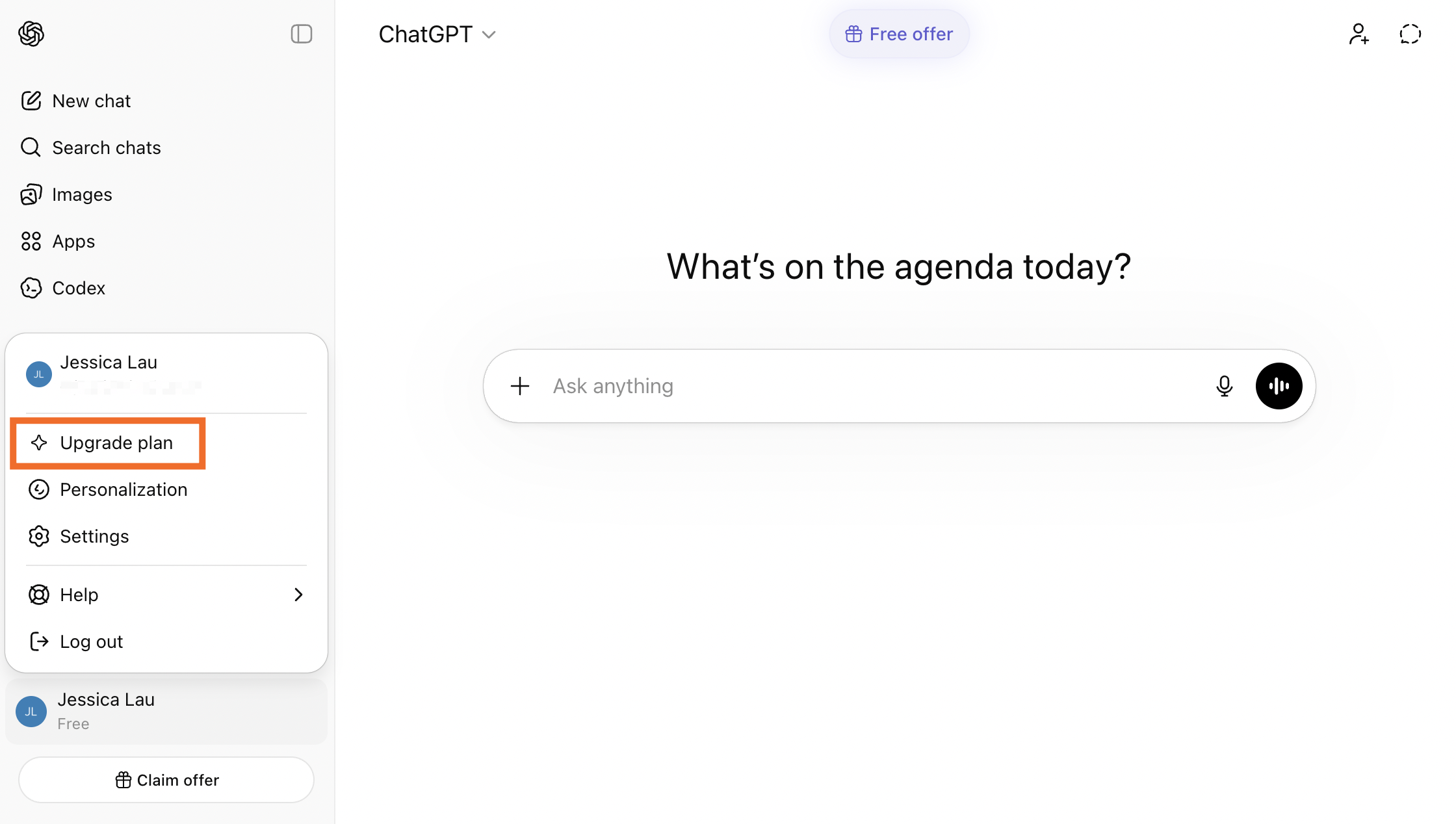
On ChatGPT's pricing page, click Pro.
Complete the subscription process.

Is ChatGPT Pro worth it?
ChatGPT Pro probably isn't worth it for most people, but that doesn't mean it's not worth it for anyone.
If you rely on ChatGPT professionally and regularly run into rate limits, ChatGPT Pro may be a solid investment. Similarly, if you're pushing the edge of what ChatGPT can do, either by exceeding context windows or needing OpenAI's reasoning models for a lot of your work, then ChatGPT Pro might be the solution you need. But $200/month ($2,400/year!) is a lot—so be sure you really need it before diving in.
For most of us, ChatGPT Plus is the best balance. It's a big step up from the free version of ChatGPT, but still a relatively affordable $20/month.
Automate ChatGPT with Zapier
If you're using ChatGPT so much that you might be willing to pay thousands of dollars a year for it, you should also be automating it.
With Zapier's ChatGPT integration, you can add ChatGPT as a step inside any AI-orchestrated workflow. For example, you can have Zapier monitor competitor pricing pages via an RSS feed. From there, ChatGPT can automatically analyze what shifted and how it affects your positioning, as well as generate suggestions for how to update your positioning, and deliver a summary to your team via Slack or email.
Zapier MCP lets you take things even further by flipping things around: instead of ChatGPT being one step in a workflow, it gives ChatGPT direct, secure access to your tech stack, so it can take actions dynamically, right from the chat interface. Learn more about how to automate ChatGPT.
Zapier is the most connected AI orchestration platform—integrating with thousands of apps from partners like Google, Salesforce, and Microsoft. Use forms, data tables, and logic to build secure, automated, AI-powered systems for your business-critical workflows across your organization's technology stack. Learn more.
Related reading:
This article was originally published in January 2025 by Harry Guinness. The most recent update was in March 2026.