
When OpenAI launched ChatGPT in late 2022, tech writers (myself included) became obsessed with testing its limits. Could it write poetry? Debug code? Explain quantum physics to a five-year-old? Once Anthropic's Claude entered the scene a few months later, the focus shifted to head-to-head task comparisons (like counting objects or navigating ethical dilemmas) to try to figure out which model was more capable.
In 2026—after countless model updates, and with game-changing agentic capabilities now available—assessing object-counting accuracy feels less relevant. With a few exceptions, Anthropic and OpenAI's flagship models are essentially at parity. That means to usefully compare them, we need to focus less on under-the-hood power and more on the features and specialized use cases that make each app unique.
In this article, I'll help you understand what sets Claude and ChatGPT apart—focusing on the latest models like Claude Sonnet 4.6 and ChatGPT's GPT-5.4—so you can choose the tool that best fits your workflow.
Table of contents:
Both apps are ridiculously easy to use and offer state-of-the-art models
ChatGPT can be used to generate images (and videos, via Sora)
Claude vs. ChatGPT at a glance
Claude and ChatGPT are powered by similarly capable LLMs and LMMs. They differ in some important ways, though:
ChatGPT is best for users who want an all-in-one AI toolkit. Its image and video generation capabilities, custom chatbots, and browser-based agentic automation make it ideal for users who want to explore the full spectrum of what AI can do.
Claude is best for users focused on coding and sophisticated creative work. Its more natural writing style, powerful agentic coding features, and thoughtful analytical approach make it the best choice for developers, writers, and analysts who need depth over breadth.
| Claude | ChatGPT |
|---|---|---|
Company | Anthropic | OpenAI |
AI model | - Claude Sonnet 4.6 - Claude Opus 4.6 - Claude Haiku 4.5 | - GPT-5.4 - GPT-5.3 - GPT-5 mini - GPT-5 nano |
Context window | Up to 1M tokens | Up to 1M tokens |
Web search | Yes | Yes |
Deep research | Yes | Yes |
Image generation | No | Yes |
Video generation | No | Yes (Sora 2) |
Voice mode | Yes | Yes |
Coding | Claude Code | Codex |
Agentic AI | Claude Cowork | ChatGPT agent |
Paid tier | $20/month for Claude Pro; Claude Max is $100/month for 5x usage or $200/month for 20x usage | $8/month for ChatGPT Go (includes ads); $20/month for ChatGPT Plus; $200/month for ChatGPT Pro |
Team plans | $25/user/month; users can collaborate via shared Projects | $30/user/month; includes workspace management features and shared custom GPTs |
API pricing | - $1 per 1M input tokens and $5 per 1M output tokens (Haiku 4.5) - $3 per 1M input tokens and $15 per 1M output tokens (Sonnet 4.6) - $15 per 1M input tokens and $25 per 1M output tokens (Opus 4.6) | - $0.05 per 1M input tokens and $0.40 per 1M output tokens (GPT-5 nano) - $0.25 per 1M input tokens and $2 per 1M output tokens (GPT-5 mini) - $1.75 per 1M input tokens and $14 per 1M output tokens (GPT-5.3) - $2.50 per 1M input tokens and $15 per 1M output tokens (GPT-5.4) |
Keep in mind that if you're a heavy AI user, you may want access to both tools—especially because you're likely to run up against usage limits. For example, while I prefer interacting with Claude, I tend to use ChatGPT for processing large amounts of data to avoid hitting Claude's usage limits.
Anthropic and OpenAI each have state-of-the-art flagship models, models for specific use cases, and legacy models that aren't as cutting edge (but are cheaper and faster).
Tool | Model | Description |
|---|---|---|
ChatGPT | GPT-5.4 | Most powerful reasoning model; available on ChatGPT Plus and above |
| GPT-5.3 | Currently the default everyday model on lower plans |
| GPT-5 mini | Affordable reasoning model, solid balance of power and cost |
| GPT-5 nano | Fastest and cheapest option |
Claude | Claude Sonnet 4.6 | Most intelligent model; best for most users |
| Claude Haiku 4.5 | Fast and most cost-effective model |
| Claude Opus 4.6 | Most powerful model for complex tasks and some coding projects |
Both apps are ridiculously easy to use and offer state-of-the-art models
What's remarkable about using ChatGPT or Claude is just how approachable the whole experience is, especially since you're dealing with the cutting edge of AI technology behind the scenes. Both apps are powered by state-of-the-art models that can handle nearly anything you throw at them—yet the user experience is no more challenging than looking up a recipe on Google.
Since Claude has a relatively focused set of features, its interface is especially minimalist: a prompt box, dropdowns to select your AI model and writing style, and the option to attach files and images.

ChatGPT has more features, so it gets slightly more cluttered than Claude if you open the side panel. Otherwise, it's practically the same experience in every way, at least on the home screen.

Just keep in mind that, unlike Claude, ChatGPT defaults to auto-selecting a model on its own based on your query (though you can proactively specify the model if you want). For casual users, this is probably a plus—it's one less thing to think about. But if you're a more experienced user, you might find yourself accidentally running a less capable model than you intended.
So, what's it like to actually use each app? I'll skip the boilerplate stuff here: most of us have used ChatGPT, Claude, or both for standard queries like writing emails, asking how often to water succulents, and uploading photos of weird rashes to see if we can just lather on some hydrocortisone and call it a day. You'll do fine with either tool for this sort of query.
The real difference now is user experience, and in most cases, Claude has the edge here. I'm frequently surprised and delighted at Claude's little UX additions, which invariably make my life easier. I'll give you a couple of examples.
First, recipes. Back when these AI apps first came out, it blew my mind that you could take a photo of the contents of your fridge and get back a custom recipe suggestion. Claude has now taken this to a new level with interactive recipe cards that let you change servings and units of measurement on the fly.

To make this even more practical in the kitchen, click the "Get cooking" button and watch Claude fire up an app that's custom-made for your recipe. It tells you exactly what to do with simple instructions, and it even includes preset timers for each step.

While ChatGPT will happily offer recipe ideas based on what it sees in your fridge, its default output is still a standard block of text. You can request an interactive recipe app and ChatGPT will create one, but it's not nearly as elegant as what Claude offers—and I had to do a few minutes of debugging to get anything to show up.

Another one of Claude's delightful UX touches is its interactive follow-up question module. If you ask a broad question, Claude often asks clarifying questions to improve its responses. What's great is that Claude speeds this process up by offering predefined answers, so rather than doing lots of typing, you can just check a box. (This is particularly helpful on mobile.)

Of course, ChatGPT has its own usability advantages. For example, you can now make changes while ChatGPT is still processing your query so it adapts mid-stream, which is far more intuitive than having to stop the process entirely to reprompt. I haven't found a way to do this with Claude, even when enabling extended thinking mode.

Despite my conviction that Claude is generally ahead of the curve on UX—it really does provide a pleasant experience—you can do pretty much anything you need to do in either app once you figure out their eccentricities.
For example, Claude and ChatGPT make it equally easy to source data, turn it into an interactive visualization, and tweak the presentation of your data until you're happy. I asked ChatGPT to measure the relative risk of earthquakes to cities on North America's west coast, and it created its own ranking methodology along with an interactive "West Coast Earthquake Risk Dashboard."

Both apps also let you organize your work into projects, letting you keep chats, files, and instructions in a single place. For example, you could upload all your relevant financial documents into a project and then ask the app to help you with financial planning, as I've done here with Claude. (Just be intentional about what kinds of things you upload, since the app can be training on your information.)

Claude is a better partner for creative work
Unlike math or similar tasks, in which your output is either right or wrong, judging creative work is subjective. Here's my take: I'm a fan of Claude's output for writing tasks and as a creative partner in general. Claude Sonnet 4.6 sounds more natural than OpenAI's GPT-5 series of models, which—while they're an improvement over the GPT-4 series—still tend to feel more generic.

I found GPT-5.4 to be meaningfully better at writing than past ChatGPT models, particularly when it comes to reducing the sort of aggressively-bulleted, over-formatted, boilerplate ChatGPT output that has slopped its way into work emails and Reddit posts. If you're going to create written content with ChatGPT, GPT-5.4 (particularly the Thinking version of the model) is your best bet.
But ChatGPT still doesn't feel like a partner. It completes tasks based on your prompt, but it doesn't think particularly strategically or offer up a variety of options unprompted. Claude does. And because getting solid content from an LLM requires plenty of back-and-forth iteration, Claude's more collaborative approach often leads to better creative outcomes.

For similar reasons, I've also found Claude to be a better partner for editing: it understands my prompts with less clarification and does a better job of staying on track and grasping the overall context of my requests.
And with Claude's Styles feature, it's easy to jump between different custom writing styles. For example, you could set up an informal writing style for internal memos, a peppier one for social media posts, and a thoughtful one for long-form content.

ChatGPT's edge when it comes to creative projects—besides its ability to generate images and video, which I'll cover next—is its Canvas feature, which lets you create documents (among other things) right inside of ChatGPT. Canvas makes it easy to adjust your document's length, add emojis, rewrite the text at a different reading level, or provide custom instructions. You can use Canvas as a standard text editor too, which is useful if you just need to make a few small tweaks before sharing your document or downloading it as a PDF.

ChatGPT can be used to generate images (and videos, via Sora 2)
ChatGPT can generate images directly within the interface. Powered by GPT Image 1.5, it's one of the most powerful AI image generators available.

And Sora 2—which is still a separate product, but is available to anyone with a ChatGPT Plus or Pro subscription—is essentially the same thing, just for video. Along with using text prompting to create videos, you can also turn an image into a video, or take an existing video clip and extend it. Sora also lets you tackle basic video editing—with options including recut, remix, blend, loop, and edit prompt—from right within the interface.
Claude Code has become the coding tool of choice for developers
It's hard to overstate just how quickly Claude has come to dominate the enterprise API and agentic coding markets.
Just look at these charts, especially the one in the middle that shows enterprise LLM usage over time.
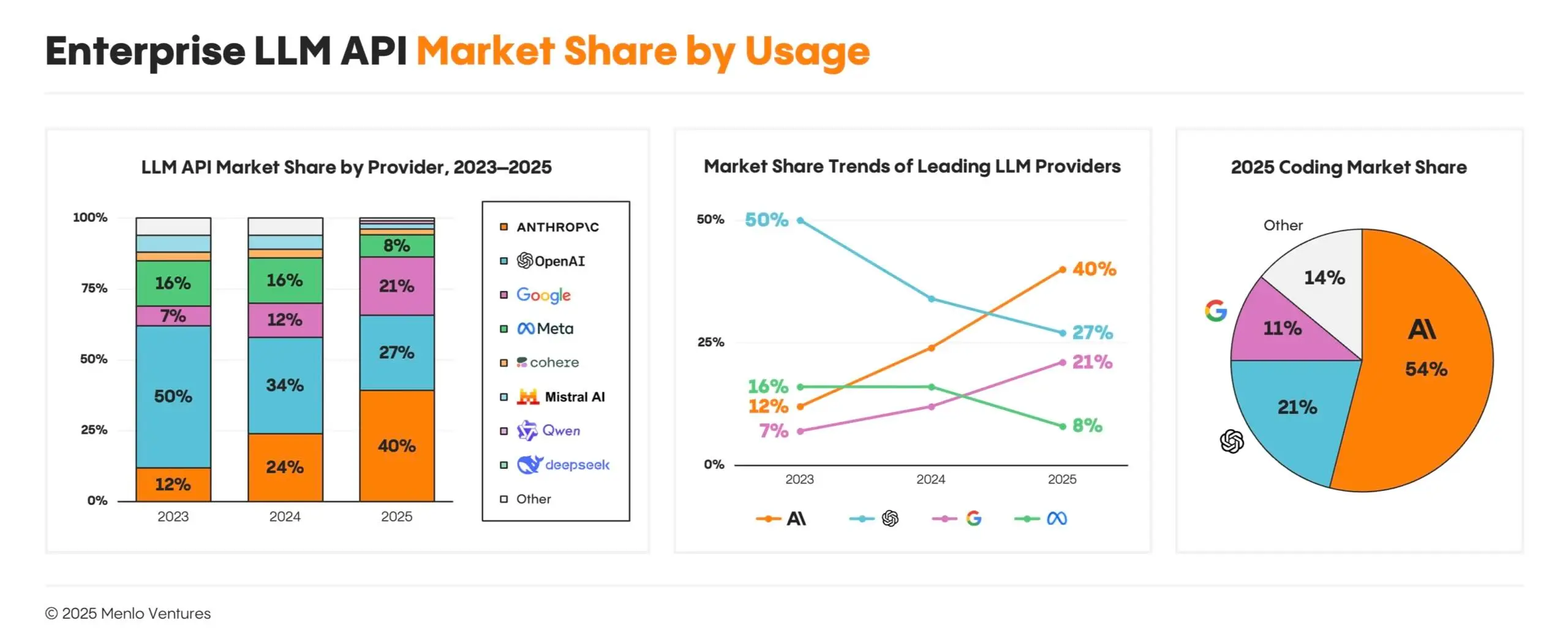
As of December 2025, Anthropic owned 54% of the enterprise coding market. Growth at the start of 2026 was particularly wild: weekly active Claude Code users doubled from January 1 to February 12, and Claude Code is now a multi-billion-dollar line of revenue for Anthropic.
Why are developers and enterprises choosing Claude? Rather than just autocompleting lines, Claude Code takes on entire projects autonomously: you describe what you want, and it plans and executes the work while checking in for input along the way. Claude Code can work independently for hours. To handle coding tasks longer on its own, it uses compaction, which lets Claude summarize its progress to avoid hitting a context wall, and agent teams, which spin up multiple Claude instances working in parallel on different parts of a task. By fully incorporating Claude Code into their workflows, developers can act more like product managers than coders. (As one developer says, "I'm a senior dev with 15 years of experience, and Opus is writing 95% of my code. I barely correct it at this point.")
Claude Code is also easy enough to prompt using natural language that even non-coders can now create production-grade software. Just download Claude's desktop app (or use the Claude Code web app) and start building.

OpenAI's answer to all this is Codex, an agentic coding tool that's broadly similar to Claude Code. In addition to boosting developer productivity, Codex offers a couple of interesting innovations, including mid-task steering (the ability to redirect an active build without restarting) and reusable automation routines stored as portable files. Anyone on a ChatGPT Plus plan or above gets access to Codex.

Codex is a massive step forward from ChatGPT's chat-based coding assistant. But for most users, Claude Code still has the edge—and as with the rest of the Claude ecosystem, UX plays a big role. One developer explains the difference like this: "Codex is quite good, 100x better than anything I used a year ago. But coding with Claude makes everything feel like a video game, and I get things done in seemingly less time while having more fun."
Both apps now offer agentic AI features
Agentic coding is already here. Next up: agentic capabilities for everything else. Both Claude and ChatGPT already have products that autonomously help with work that isn't coding, from organizing files to booking a dentist appointment.
Claude's agentic product is called Cowork, accessible via Claude's desktop app for macOS and Windows. It works directly on your file system: you direct it to a folder, describe the outcome you want, and let Claude map out specific steps and execute them. For example, Cowork can extract data from a folder full of dozens of PDFs and organize it in a spreadsheet.

ChatGPT agent operates on the web. Rather than interacting with your computer's file system, ChatGPT agent uses a virtual browser to navigate websites, fill out forms, click buttons, and take actions on your behalf. It's a better fit for online tasks like data scraping, research, and travel booking. To use it, click the + dropdown and select Agent mode.

Both are getting better fast. Claude Sonnet 4.6 recently reached functionality parity with human performance for the first time by hitting 72.5% on the OSWorld benchmark, a test of real-world computer use across apps like Google Drive and Excel. (A year prior, in February 2025, Claude scored just 28%.) GPT-5.4 has made equally impressive strides, and recently scored 75% on the same OSWorld benchmark.
ChatGPT lets you build your own chatbot
On ChatGPT, you can create your own custom GPT for others to interact with, tweaking settings behind the scenes to train it to generate responses in a certain way. You can also adjust how it interacts with users; for example, you can instruct it to use casual or formal language.
In the example below, I've created Learn Anything Fast, a custom GPT that helps users create structured learning plans on any topic.

Once you've got a custom GPT that works well, you can share it with anyone else who's a part of your ChatGPT Team or Enterprise plan, helping you standardize output across your organization.
ChatGPT has some extra bells and whistles
I've already made the case that ChatGPT is a more flexible tool with more features. Some of those features, like custom GPTs, are useful for professionals but not all that game-changing for regular users. But the features below can make ChatGPT significantly more practical for everyday use.
Advanced voice mode
If you want a preview of how AI will work its way into consumer devices over the next few years, take a few minutes to play around with ChatGPT's advanced voice mode. Using the mobile app, you can give ChatGPT access to your phone's camera and ask it questions about anything it can see. I showed this feature to my wife, and it truly spooked her: using my phone's camera, ChatGPT figured out our dog was a Schnauzer mix, and it quickly gathered information about our travels after scanning the photos on our refrigerator.
You can also enable screen sharing, which lets ChatGPT analyze what's displayed on your phone. I had a harder time finding an immediate use case for this, but I can imagine it being incredibly helpful for vision-impaired users.
Tasks
If, like me, you already have a tasks app that manages your to-do list, you might be confused as to why you would get ChatGPT involved in your task management. But after a little experimentation, I get it: for certain applications, adding AI into the mix opens up new possibilities.
For example, I created the following language-learning task that relies on AI to send dynamic learning prompts: "Every day at 3 p.m., give me a sentence in Spanish and ask me to translate it into English. Make them progressively more difficult."

ChatGPT Tasks used to have their own sidebar menu item, but now you just create them by making the request within a chat. You can edit existing tasks in the Settings menu.
Atlas
Atlas is OpenAI's AI-first browser (currently for macOS only). Rather than switching between your browser and ChatGPT, Atlas offers a persistent AI sidebar that has full context of whatever page you're on, so you can ask questions, rewrite text, or start a conversation without having to explain what you're looking at. ChatGPT learns from your browsing history over time, so you can ask things like "find the job postings I was looking at last week" and actually get a useful answer.

Third-party GPTs
In addition to the ability to create custom GPTs, ChatGPT offers a marketplace of sorts where anyone can release their own specialized GPT. Popular GPTs include a coloring book image generator, an AI research assistant, a coding assistant, and even a "plant care coach."
Both apps integrate with Zapier
Both Claude and ChatGPT integrate directly with Zapier, which means you can connect them all to the other apps you use most. Automatically start AI conversations from wherever you spend your time, and send the results where you need them.
You can also use Claude or ChatGPT with Zapier MCP, which gives your AI tools governed access to the thousands of apps in Zapier's directory, so you can securely do things in your tech stack without ever leaving your AI chat window.
Learn more about how to automate Claude or how to add ChatGPT into your workflows, or get started with one of these pre-made Zapier templates.
Generate an AI-analysis of Google Form responses and store in Google Sheets


Write AI-generated email responses with Claude and store in Gmail

Create LinkedIn posts with Claude and post to LinkedIn


Automatically reply to Google Business Profile reviews with ChatGPT


Send prompts to ChatGPT for Google Forms responses and add the ChatGPT response to a Google Sheet
Create email copy with ChatGPT from new Gmail emails and save as drafts in Gmail
Zapier is the most connected AI orchestration platform—integrating with thousands of apps from partners like Google, Salesforce, and Microsoft. Use forms, data tables, and logic to build secure, automated, AI-powered systems for your business-critical workflows across your organization's technology stack. Learn more.
ChatGPT vs. Claude: Which is right for you?
Choose Claude if you want an AI tool to use as a sparring partner for creative projects—writing, coding, or brainstorming. Its more natural writing style, powerful Artifacts feature for interactive apps and data visualization, and thoughtful analytical approach make it ideal for developers, writers, and analysts who need sophisticated text and code capabilities. Claude's coding advantage in particular has become hard to ignore: Claude Code is now the most popular agentic coding tool among professional developers and enterprises, and Cowork is applying the same agentic logic to non-coding work.
Choose ChatGPT if you're looking for a jack-of-all-trades tool. Generating text is just the start: you can also create images, create videos with Sora, set recurring tasks, or connect to custom-built GPTs trained for niche purposes like academic research. And with ChatGPT agent, you can automate web-based tasks like filling out forms, booking appointments, or pulling information from multiple sites. ChatGPT's broader feature set and browser-based agentic automation make it perfect for teams and solo users who want to explore the full spectrum of AI.
If you have a lot of reasons to use AI in your work, consider using both, especially given usage limits and different pricing tiers for specific use cases. For example, you might use Claude for in-depth writing and coding projects while using ChatGPT for quick searches, image and video generation, and web-native agentic tasks.
Or, if you're looking for something that can take it one step further—an AI agent that can help you automate all your business workflows—try Zapier Agents.
Related reading:
This article was originally published in April 2024. The most recent complete update was in January 2025. The most recent update was in March 2026.


