You ever watch a hot dog eating contest? It's impressive to see someone wolf down five franks per minute, but you just know the stomach pains are coming.
This is the image that comes to mind when I hear about companies tracking how many AI tokens their employees consume, to make sure they're using AI "enough." And even without this kind of performative AI theater, your monthly AI bill might be giving you Joey Chestnut levels of indigestion.
If your AI token spend costs more than whatever amount of money AI is saving you, it's time to rethink your approach. Here, I'll show you how Zapier lets you access the power of all the state-of-the-art models without token-maxxing, and definitely without the heartburn.
Table of contents:
The problem: Wasted tokens and AI model cost differences
AI can do almost anything, so it's tempting to have AI do almost everything—especially when there's pressure to be going all in on AI.
But not all workflows require AI. Plenty are deterministic, meaning the same input always triggers the same steps and ends in the same result. For example, every time a lead fills out a form, you might want their information to flow into your CRM, a Slack message to ping the assigned rep, and the lead placed into the right nurture sequence. Every one of those steps has exactly one right answer, so there's nothing for an AI to figure out. Work like this belongs in a deterministic automation.
Of course, sometimes you do need AI in your workflows—say, if you want to analyze a lead's open-ended form response and summarize it for your reps before they reach out. In those cases, you need to be sure you're using the model with the best price-to-performance ratio for that specific task—otherwise, you can be paying for filet mignon when all you wanted was a Nathan's.
You can solve both of these problems with Zapier: combining deterministic workflows with AI, and selecting the best model for the job.
The solution: Use Zapier to spend fewer AI tokens
There are three main things you can do to make sure your token spend doesn't look like the GDP of a small country.
1. Automate the predictable parts of your workflow
When each step should always run the same way, why pay an LLM to come up with that answer on every single run? If a process runs predictably, build it once in Zapier, and let if/then logic take it from there. You'll pay $0 for AI tokens, and you'll only use a task for completed work in Zapier.
As an example, let's say you want to route incoming leads from Facebook Lead Ads to sales reps. Small to mid-sized business leads go to one group of reps in an even rotation. Enterprise leads go to a different pair of reps, weighted so that one gets 60% of them and the other gets 40%.
All of those conditions are predictable. You can route the leads using logic and rule conditions that you don't need an AI for. That's because every condition here is a simple check against structured data. Is the company size above or below a certain threshold? Whose turn is it in the rotation? Has the senior rep hit their 60% share this week? A rule can evaluate these questions instantly and get the answer right 100% of the time.
An LLM evaluating the same conditions costs you tokens on every run. And because models are probabilistic—they generate answers by predicting what's most likely, not by executing fixed logic—the same lead could occasionally get routed to the wrong place. When a rule exists, paying a model to guess at it means paying extra for the occasional wrong answer.
2. Call AI only where it counts
So what if you do need AI in your workflow? For example, maybe you need AI to analyze the lead's company and determine the best rep for the job. Rather than running all your steps through AI, you can build an automation in Zapier with an AI step in the one spot that needs it.
To determine where you really need AI, look for situations that involve interpretation rather than rules, the places where the right answer depends on reading and understanding something. That's where AI earns its tokens. In practice, that's usually one of five jobs:
Summarizing
Analyzing
Classifying
Drafting
Extracting
If a step in your workflow matches one of those, it's a candidate for AI. If it doesn't, automation can probably handle it.
AI by Zapier is our built-in tool for adding AI steps to your Zap workflows. You can drop it into any spot in your workflow, and it comes with access to several models from OpenAI, Anthropic, and Google without requiring you to pay for a separate AI subscription or API key.
A standard-model step costs just one Zapier task, the same as any other action in your Zap. If you need more powerful reasoning, advanced models cost three tasks and premium models cost five—but you pick the tier that matches the job, and you can swap models anytime without rebuilding anything.
For more information on our AI by Zapier model tier pricing, check out our help docs.
3. Swap models so you're value-maxxing (not token-maxxing)
For the steps that do need AI, you can swap the model underneath your AI by Zapier action anytime, so you're never stuck with one provider's pricing.
Every Zap you build begins with a trigger (what sets off the workflow) followed by actions (what happens after the trigger). When you add an AI by Zapier action, you'll configure it with a prompt and knowledge sources, and at that point, you'll also select the model you want to power your step.

You can pick major models from OpenAI, Anthropic, and Google, or bring in your own models through Azure OpenAI and Amazon Bedrock. Several are included for free, meaning you don't need to pay (or even sign up) for an account or tokens, to use them—a huge advantage of building on Zapier.
If a provider changes their pricing for one of the included models, your cost stays the same: you pay the same number of tasks per run regardless of what's happening in the token market. A standard step is still one task. An advanced step is still three, and a premium task is still five. You're insulated from per-token price swings.
New models ship all the time. The one that's great at your use case today can get dethroned weeks later by a rival that does the job better, and for less. When that happens, you want to pounce the moment the math tips in your favor. To help you time that switch, you can use AutomationBench, Zapier's AI benchmark that tests models against real, multi-step workflows. So whenever a new model ships, check the AutomationBench leaderboard to see whether it pays to switch out your model.
Just remember that your goal is to value-maxx, not token-maxx. In other words, a new model that's 14% better or 34% faster doesn't matter if it costs 10 times as much to run. The number you actually want to drive down is the cost per task.
What this looks like in practice
To see how all these recommendations work together, let's walk through a hypothetical Zap.
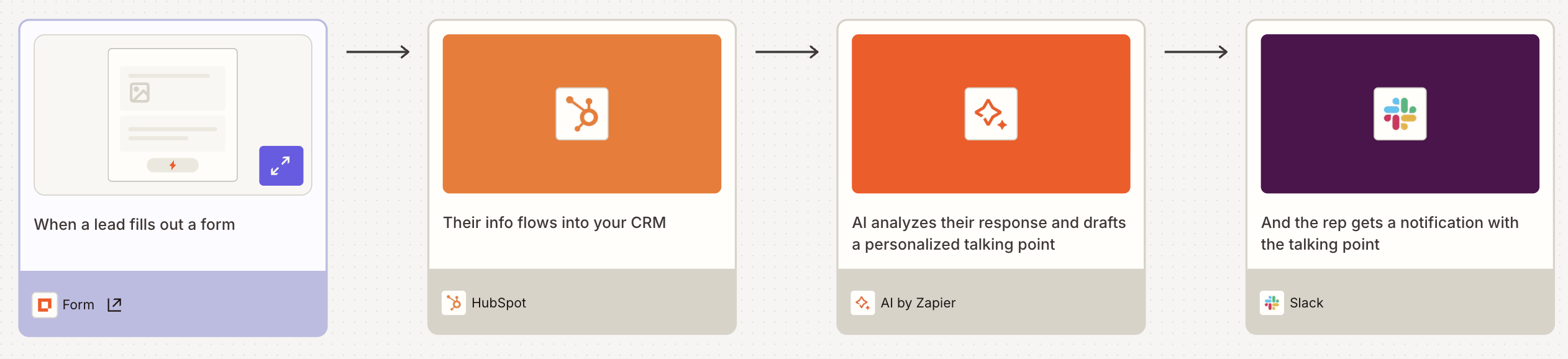
Imagine you build a four-step automation where:
A lead fills out a form
Their info gets added to HubSpot
AI by Zapier analyzes their form responses and drafts a personalized talking point
A Slack message pings the assigned rep with a summary of the response and the talking point

Triggers on Zapier are free—they don't count toward your task limit. Sending the info to a CRM counts as one task. At a standard tier, the AI by Zapier action also counts as one task. And so does the Slack message. That means you're looking at a cost of three tasks per run.
If you later discover that Claude handles lead summaries more accurately than Gemini, or that a newer model does it just as well for less, you can swap the model in AI by Zapier. You don't even have to rebuild your Zap.
Now imagine you'd built this entire workflow as a scheduled task inside an AI assistant instead. Every step—the form trigger, the CRM write, the analysis, the Slack message—would burn tokens. Across a thousand form submissions, that's around $1,300 in tokens at current AutomationBench averages, and even more expensive on the more advanced models.
You can build that same workflow on Zapier for a fraction of the cost. And it'll likely be more accurate, too. Because instead of pushing every step through an AI model, including the ones that don't really need AI, you let Zapier handle those deterministically and save the model for the single step that calls for judgment.
If you're working directly from an AI assistant, there isn't much wiggle room: you're using tokens every time you prompt the AI. But to make those prompts even more powerful, you can install Zapier MCP in your AI, which lets you take action across thousands of apps right from your conversation. Just remember: if you're running the same workflow hundreds or thousands of times from your chat window, that belongs in a Zap.
Trim the fat from your AI spend
If your AI bill is outpacing your AI's value, you're probably paying inference prices for work that a more cost-effective automation could do. So automate your predictable steps, save AI for the judgment calls, and keep your model options open. Because unlike a hot dog contest, nobody's handing out trophies for consuming the most AI tokens.
To get started, head to the Zap editor today and start building more efficient AI-powered workflows.