Do you use an email outreach platform like Klaviyo to engage your customers? Then you're already halfway there when it comes to giving your audience a personalized customer experience.
But if you want to tap into Klaviyo's full marketing potential, you should think about combining it with Zapier. With just a few Zaps—our word for automated workflows—you can effectively segment customer lists, bring in new subscribers, and track performance automatically. Here's how.
Zapier is the most connected AI orchestration platform—integrating with thousands of apps from partners like Google, Salesforce, and Microsoft. Use forms, data tables, and logic to build secure, automated, AI-powered systems for your business-critical workflows across your organization's technology stack. Learn more.
Skip ahead
To get started with a Zap template—what we call our pre-made workflows—just click on the button. It only takes a few minutes to set up. You can read more about setting up Zaps here.
Add leads and subscribers to Klaviyo from forms
Establishing a seamless data flow from your lead-capture forms to Klaviyo is essential for nurturing relationships with your audience and bolstering engagement. With automation, you can cut out the manual chore of transferring contact information, efficiently populating your Klaviyo subscriber list while giving yourself back time to focus on planning impactful email campaigns.
Whether a visitor fills out a contact form on your Squarespace site or submits a form on Webflow, these workflows ensure your lead-capture form seamlessly connects with Klaviyo.
Create Klaviyo subscribers from new Squarespace Forms form submissions


Add Klaviyo subscribers for new form submissions in Webflow


Add Klaviyo subscribers for new form submissions in Gravity Forms

Have you tried Zapier Forms yet? It lets you build an automation-first form with built-in AI assistance—and no submission-based billing. To learn how it works, check out the Forms feature guide.

Use webhooks with Klaviyo
Maybe you rely on an app that doesn't have a Zapier integration just yet, but you're 100% certain you want Klaviyo's automation working for you. Fortunately, you can use Webhooks by Zapier to set up a workflow connecting any of the thousands of apps in our directory to Klaviyo as long as they have an API.
With webhooks, you can easily send information to and from Klaviyo—just use these templates to get started.

Create Webhooks by Zapier posts for new Klaviyo events
Connect Klaviyo to your ad platforms
One of the most powerful ways to use Klaviyo is to connect your email segments directly to advertising platforms. When you add a profile to a specific segment or list in Klaviyo—say, customers who've purchased in the last 30 days or subscribers who've engaged with recent campaigns—you can automatically add them to a customer list in Google Ads. This lets you create highly targeted lookalike audiences or retargeting campaigns based on your most engaged customers, turning your email data into advertising gold.
Add new Klaviyo profiles to Google Ads customer list when they are added to a segment or list

Any leads you generate from ad platforms can also get automatically sent to Klaviyo. For example, Facebook Lead Ads can collect lead information within the platform—customers sign up without leaving Facebook—and a Zap sends over the new leads. No matter which platform you choose, the destination is the same: add that new lead as a subscriber in Klaviyo and start working that email marketing magic.
Add Klaviyo subscribers from new ClickFunnels Classic contact activities

Add Klaviyo subscribers for new Facebook Lead Ads leads


Add Klaviyo subscribers for new TikTok Lead Generation leads

Segment your leads and customers automatically
Whether a new customer makes a purchase (hurrah!) or someone signs up for an event you're hosting, you'll want to continue nurturing them afterward. However, not everyone will be a fit for the same campaign. For example, you might want to send welcome messages to new customers or target a subset of customers who've purchased a product above a certain price.
With these simple Zaps, you can automatically create specific lists in Klaviyo whenever a specific purchase is made in another app. Or you can tag certain customers or add others to a segment in Klaviyo. That way, you can target different audiences and deliver personalized messages that resonate with each group's unique needs and behaviors.
Create lists in Klaviyo from new Eventbrite attendees


Add tags to Klaviyo lists from new Mailchimp subscribers

Connect Klaviyo with Google Sheets
Google Sheets is something of a circuit breaker for software automation. You can record new subscribers from Klaviyo into Google Sheets to keep tabs on every email you collect, true. But Google Sheets isn't a dead end. Work new spreadsheet rows into sheets, and you can more easily send it to other apps. For instance, maybe a new Google Sheet row becomes a new task for a team member within Trello.
Once you've recorded subscribers into Google Sheets, you have a separate list you can organize, funnel, and automate. You can use this list to categorize customers by specific triggers, turning a massive audience into a list of customer segments. This helps you write specifically crafted emails to each segment, enhancing personalization. Or you can simply keep tabs on your new emails within a separate app and never worry that you need a backup.

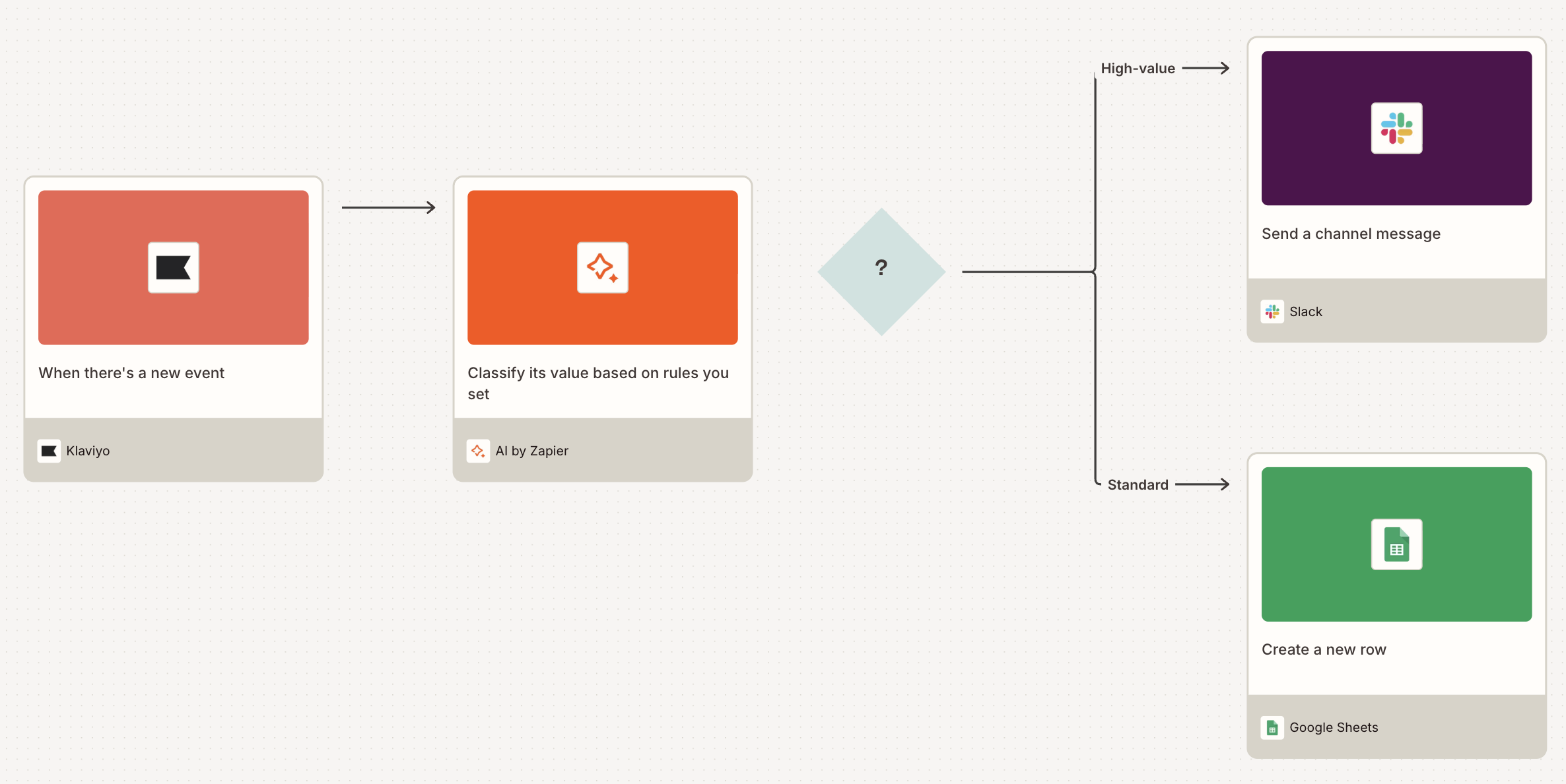
Pro tip: Try adding a path step and an AI step to this workflow. For every new Klaviyo event, AI can classify its value. Then, depending on the outcome, the Zap can either send a Slack message (for strong buying signals) or create a spreadsheet row (for standard events).

The process also works in reverse—use new rows in Google Sheets to automatically add Klaviyo subscribers. Use these Zaps to automatically import over a previously-existing email list from other applications.
Add new Klaviyo subscribers from a Google Sheets spreadsheet
Add subscribers to Klaviyo from new rows on Google Sheets
Create Klaviyo events for new or updated Google Sheets rows
Turn Klaviyo into your "everything" email marketing software
Are you ready to supercharge Klaviyo? Use the Zaps here to supplement your Klaviyo list, import old emails into your new system, or generate leads while you sleep via webforms, online ads, and landing pages. If everything goes according to plan, you may start making sales without noticing.
And this is just the start of what you can do with Klaviyo and Zapier. What will you automate first?
This article was originally published in January 2022 by Ana Gotter, with previous updates by Daniel Kenitz and Elena Alston. It was most recently updated in January 2026.