
Working at Zapier means I spend a lot of time thinking about how to make software do my job for me. Not in a replace-me-with-a-robot kind of way (I like health insurance); more in an I-should-be-focusing-on-more-important-things kind of way.
Automation used to be the best way to do that. Then AI came along and made automation smarter. Hence the extremely creative name: AI automation.
Here, I'll break down what AI automation is and how to implement it, with real examples from teams already using it to offload the worst parts of their jobs.
Table of contents:
What is AI automation?
AI automation is the combination of artificial intelligence (AI) and traditional automation—AI models embedded into your workflows so software can handle work that requires judgment instead of only work that follows fixed rules. You'll also hear it called intelligent automation or cognitive automation.
Where a standard automation runs the exact steps you set up, an AI-automated workflow can interpret messy inputs and adapt when conditions change, learning from experience as it goes. For your business, that means automating work that used to be too complex to hand off—like triaging support tickets based on what's said between the lines—and workflows that get more self-sufficient the longer they run.
Learn more: Automation vs. AI: What's the difference?
Benefits of AI automation
AI automation extends the advantages of standard automation—speed and consistency—to work that used to need human judgment. Here's what that looks like in practice.

Saves employee time and energy: Automation alone can turn a seven-hour manual task into a five-minute one. Add AI that can interpret data and make complex decisions, and you can hand off entire processes instead of just the repetitive steps.
Reduces errors: When programmed correctly, automated tools are more accurate than people (sorry, humans) because they follow the process to the letter every single time. AI adds another layer, analyzing volumes of data no person could get through to inform decisions a rules-based tool couldn't make.
Identifies opportunities: When you integrate AI tools into your existing workflows, they can flag patterns you'd otherwise miss—like a customer segment churning at the same point in onboarding, or a product page outperforming the rest of your catalog
Improves customer satisfaction: The more streamlined and intelligent your delivery process, the happier your customers. Plus, imagine chatbots actually understanding your customers' needs, surfacing relevant answers and resources, and knowing when it's time to connect them to a human representative. A dream come true.
Helps catch and patch security vulnerabilities: AI automation can continuously scan your software and surface potential security risks. In some cases, it can correct those vulnerabilities—often faster and more accurately than a human could.
Increases organizational agility: AI automation can spot changes in customer behavior or supply chain hiccups early, so you can adjust operations before a blip becomes a problem.
Drives innovation: AI automation is a powerful R&D assistant. It can crunch vast datasets for that aha insight, prototype a web app for a partner, or rapidly test new product features while your team dreams up the next big thing.
Key components of AI automation
AI automation is made up of a handful of technologies working together. Here are the components you'll run into most often when you put AI to work across your business.
Machine learning and deep learning
Machine learning (ML) is the type of AI that lets systems learn from data, spotting patterns and improving over time without being explicitly programmed for every variation. Deep learning is an advanced subset of ML that uses neural networks to find more intricate patterns in much larger datasets. This learning layer is what lets an AI automation get smarter with use, like a fraud detection system that refines what "suspicious" looks like with every transaction it processes.
Learn more: Machine learning vs. AI: What's the difference?
Natural language processing (NLP)
Natural language processing lets computers understand and generate human language, written or spoken. That matters because so much business information is unstructured language—for example, emails, reviews, and support tickets.
NLP is what lets an AI automation read a batch of customer reviews and gauge overall sentiment, or transcribe a meeting and route the action items to the right people.
Generative AI and large language models (LLMs)
Generative AI creates new content—text, images, audio, code—instead of only analyzing what already exists. Large language models (LLMs), the AI models behind tools like ChatGPT and Claude, are the type you'll meet most in business workflows: they can draft and summarize text or answer questions in plain language.
In AI automation, generative AI handles the content-heavy steps, like drafting a first-pass reply to a customer email or summarizing a 40-page report before it hits Slack.
AI agents and agentic automation
An AI agent is AI that can work toward a goal on its own—planning its own steps and using tools, and then adjusting based on what it finds—instead of waiting for instructions at every turn.
In AI automation, agents take on multi-step work that used to need a person in the middle: researching a new lead and scoring it before it reaches your CRM, or pulling context from past support tickets to suggest a resolution. Agentic automation is the broader term for workflows built around this kind of autonomy.
Learn more: What is agentic AI? And how you can start using it
Robotic process automation (RPA)
RPA bots handle repetitive, rules-based tasks by following predefined scripts—for example, filling out forms, or shuttling data between spreadsheets and CRMs. There's no learning involved, and that's the point: RPA does the high-volume, predictable work reliably, which frees the AI components to focus on the judgment calls.
Learn more: Agentic AI vs. RPA: Everything you need to know
Computer vision and intelligent document processing (IDP)
Computer vision lets software interpret images and video, whether that's spotting defects on a production line or reading text from a scan via optical character recognition (OCR).
Intelligent document processing builds on it: instead of just extracting text from a document, IDP uses ML and NLP to understand it—classifying an invoice versus a purchase order, pulling out the dates and amounts, and feeding validated data into your other business systems.
Business process management (BPM) and process mining
BPM is the discipline of mapping your end-to-end workflows and redesigning them to run better. AI enters the picture through process mining: software that analyzes how your processes actually run, showing where work gets stuck and what's ripe for automation. For a lot of teams, it's how they decide where AI automation should go first.
How to implement AI automation
Implementing AI automation isn't a set-it-and-forget-it kind of deal. You'll have to monitor and adjust as your business (and the tech itself) evolves. But the path from initial idea to working workflow follows the same five phases.
Find the right process. Think of this as the scouting mission. You're looking for processes that are clunky or data-heavy—especially ones that involve the kind of judgment calls that keep landing in someone's inbox. Team complaints about what eats their time are good leads, and process mining tools can give you a clearer map of where work gets stuck.
Analyze it. Map how the process currently runs and where exactly it breaks down, and then decide whether AI automation makes business sense there. Set clear objectives now, so you know what "better" looks like before you build anything.
Build the solution. Design the smarter version of the workflow and pick the right technologies for it (the components above are your menu). If you have the team, you can build in-house. Alternatively, you could turn to automation as a service (AaaS), where experts construct and configure the system for you.
Automate and integrate: This is the go-live stage where you bring your intelligent workflow to life. Using Zapier, you can connect 9,000+ apps and orchestrate the entire process, setting up triggers, actions, and conditional logic that put the AI models to work. The test of a good integration: data moves between your automation and your core systems (like a central database or ERP) without anyone re-keying it.
Optimize and retrain: AI models degrade as the real world changes—a problem known as model drift. Keep the system sharp by monitoring AI-specific metrics, like the model's confidence in its own decisions, and retraining it on fresh data. The most valuable feedback loop is human: when someone corrects an AI mistake or handles an exception, feed that correction back in as training data so the automation improves with every miss.
AI automation examples and use cases
AI automation looks different depending on which team is running it. Here's what it looks like in practice across five business functions—including real results from Zapier customers.
AI automation example for sales

How sales teams use AI automation: Qualify inbound leads and route them to the right rep automatically, so the team spends its time selling instead of sorting.
Popl's sales team was fielding hundreds of inbound leads a day across HubSpot and Salesforce, so they used AI automation to sort and assign them manually.
The automation: When someone submits a demo request, a Zap workflow verifies the lead data in Google Sheets, notifies the team in Slack, and routes the lead to the right rep based on region and company size.
The AI: OpenAI reads inbound emails to separate spam from genuine sales inquiries and enriches each lead with company details pulled from its email domain.
The results: 100+ workflows built, $20,000 in annual savings, and a sales engine that scales without added overhead.
Want to give your sales process a similar upgrade? Explore how automation and AI can streamline your sales pipeline.
AI automation example for marketing
How marketing teams use AI automation: Turn rough ideas into published content, with AI doing the drafting and automation moving each piece through review to publication.
Before working with Easy Aiz, one content agency needed four to five hours and several sets of hands to publish a single blog post. Now the whole thing runs off a voice note.
The automation: Dropping a voice note in a dedicated Slack channel triggers the workflow, which compiles the finished piece into a WordPress draft, routes it through Slack for approval, and publishes and promotes it once approved.
The AI: AI by Zapier transcribes the note and turns it into a blog title and optimized draft, Midjourney generates the images, and AI writes platform-specific captions for Facebook, LinkedIn, and Instagram.
The results: 100+ hours saved per month and content delivered five times faster.
AI automation example for customer success
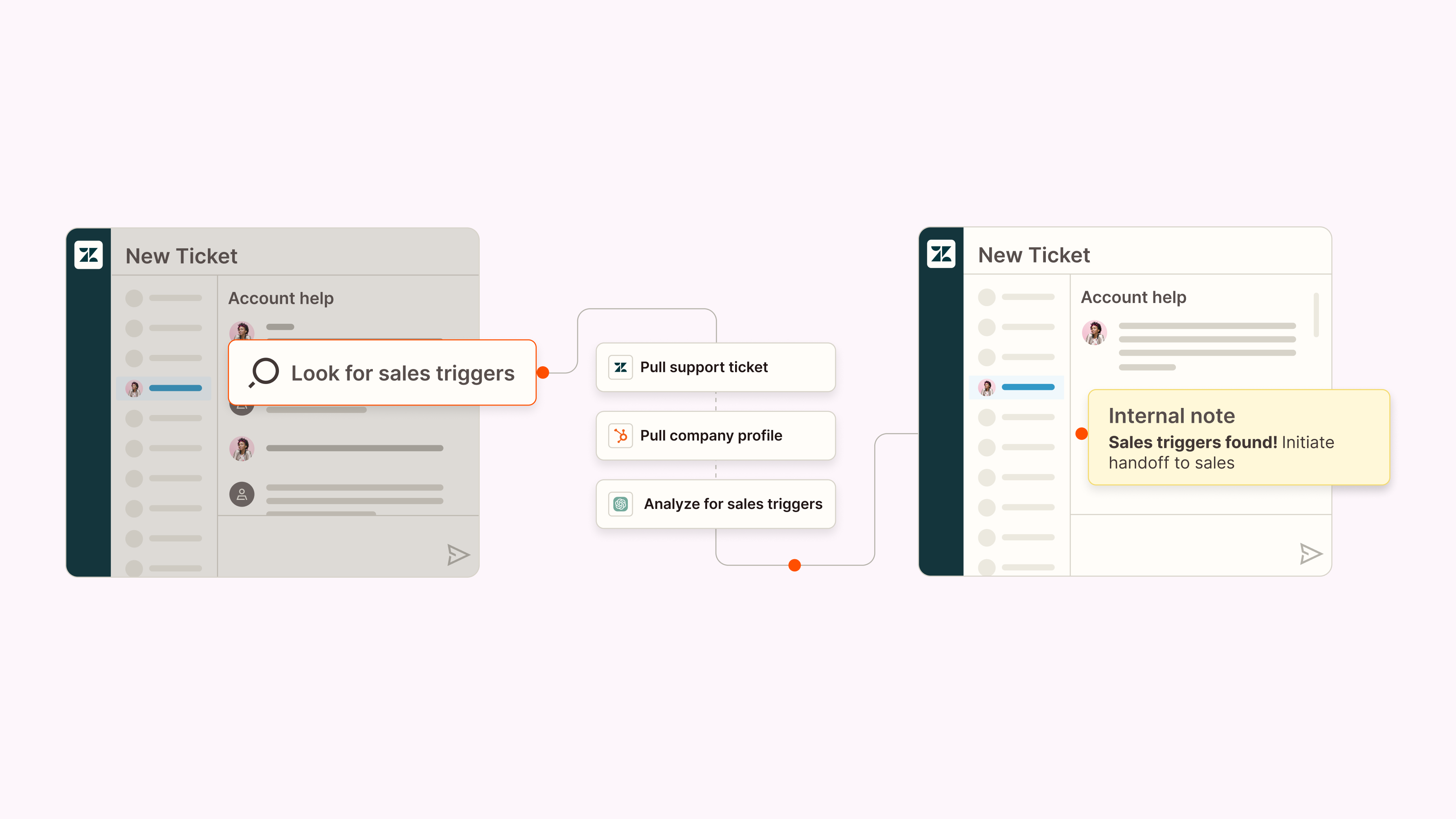
How customer success teams use AI automation: Spot churn risk before it becomes churn, and keep every customer touchpoint logged without anyone doing it by hand.
Healthie, a healthcare platform serving 40,000+ providers, built AI agents on Zapier that work across its customer support and sales teams:
The automation: Every week, a scheduled workflow checks Salesforce, HubSpot, Vitally, and Help Scout for account signals and posts a summary to Slack, where support and product leads can act on it. On the call side, once a Zoom call recording ends, it automatically becomes a Salesforce record.
The AI: Agents analyze those account signals for churn and expansion risk, and score each customer call against a coaching framework—posting feedback to the rep's Slack along with a ready-to-send follow-up email draft.
The results: over 60 hours saved per week across roughly 20 reps and CSMs, and retention work that starts before an account is at risk instead of after.
AI automation example for IT

How IT teams use AI automation: Triage and resolve help desk tickets automatically, saving human attention for the exceptions.
Remote uses an AI-powered multi-channel support system to help field 1,000+ tickets a month.
The automation: Requests come in through Slack, email, or a chatbot; a webhook pulls the employee's data from Okta; and every ticket is logged in Notion and synced to Zapier Tables, with Slack delivering real-time updates. Team members self-assign tasks with an emoji reaction.
The AI: ChatGPT classifies and prioritizes each request, and AI steps pull insights from past tickets to suggest solutions—delivered straight to the requester.
The results: nearly 28% of tickets handled automatically, saving roughly $500,000 a year that the company didn't have to spend on additional headcount.
AI automation example for eCommerce
How eCommerce and retail teams use AI automation: Answer routine customer questions automatically, with a human approving the final send.
An eCommerce company could run the following:
The automation: A customer email arriving in a help desk triggers the workflow, which checks the customer's membership status against a database and pulls their purchase history.
The AI: ChatGPT reads the message, references institutional knowledge—policies, membership details, processes—and drafts a reply, which lands in the store manager's inbox ready to review and send.
Tips for a successful AI automation strategy
AI automation can reshape how your organization operates, which is exactly why you shouldn't wing it. A few things to get right from the start:
Get buy-in from top management: Skip the generic pitch about AI being the future. Explain how your organization can uniquely apply AI automation, and what the tangible ROI looks like.
Start with the most time-consuming tasks: Don't throw AI automation at everything at once. Automate the processes eating the most hours first, and save the "it would be nice..." category for later. Early wins buy you the credibility for bigger projects.
Focus on data governance and quality: Your AI systems are only as good as the data they're fed. Establish solid governance practices so your data stays accurate, consistent, and secure, and so you can answer questions about how it's being used.
Address ethical considerations upfront: Think through potential bias in AI decision-making, how customer data is handled, and how transparent you can be about where AI is making calls. It's much easier to build this in from the start than to retrofit it after something goes wrong.
Plan for workforce upskilling: As AI automation takes on more tasks, your team's roles will shift. Offer training and development opportunities so people learn to work alongside these systems.
Build AI automation workflows with Zapier
The pattern behind every example in this article is the same: a deterministic workflow with AI judgment inside it. The workflow part never improvises—the same trigger follows the same steps every time, without burning through tokens—while AI handles the moments that need interpretation, like reading a support ticket or drafting a reply.
Zapier offers multiple entry points—just pick the one that fits your work. Zapier Copilot will orchestrate AI-powered workflows for you across 9,000+ apps, with AI by Zapier adding the smart steps where they belong. Or if you already work in an AI assistant like ChatGPT or Claude, Zapier MCP gives that assistant access to the same apps, so it can take action instead of just responding.
However you get in, every connection runs through a single governed layer: you control exactly which apps your AI can reach, with granular permissions and activity you can audit from one place.
Build automations from wherever you work. Describe the outcome you want, and Zapier connects your tools, runs the steps, and stays on the job after you close the chat. Combine AI with reliable, deterministic automation across 9,000+ apps. Get started for free.
AI automation: FAQ
A few questions come up almost every time someone starts looking into AI automation. Here are the short answers.
Is AI automation the same as RPA?
No. Robotic process automation (RPA) follows predefined scripts to handle repetitive, rules-based tasks, whereas AI automation combines that kind of automation with AI models that can interpret context and adapt to change. In practice, RPA is often one component inside an AI automation system, handling the predictable steps while AI handles the decisions.
Do you need coding skills to use AI automation?
No. No-code platforms like Zapier let you build AI automation using plain language. Describe what you want to accomplish, and the built-in AI assistant will brainstorm and configure the workflow for you across your entire tech stack, complete with AI steps that summarize, classify, or draft along the way. Coding skills expand what you can build—custom models, API-level integrations—but they're not the price of entry.
What's the difference between AI automation and AI agents?
AI automation embeds AI decisions inside a structured workflow that runs the same steps every time. An AI agent works toward a goal more independently—planning its own steps and using tools as it goes. They're complementary rather than competing: agents suit open-ended, multi-step work, while AI automation suits processes that should behave predictably at scale.
Is AI automation safe to use with business data?
It can be. The risk isn't the AI itself, but ungoverned access to your apps and data. With Zapier, every AI automation runs through a single governed layer: you control exactly which apps (and which actions within them) an AI step can touch, with granular permissions and activity you can audit from one place. And for decisions too important to fully hand off, you can weave in human-in-the-loop checkpoints to pause the workflow until a human signs off.
Related reading:
This article was originally published in April 2023 and has had contributions from Luke Strauss and Michael Kern. The most recent update was in July 2026.


