
We independently review every app we recommend in our best apps lists. When you click some of the links on this page, we may earn a commission. Learn more.
Back in college, I hung a whiteboard on my bedroom wall to help me with organization. I painted it with test results, project due dates, and general thoughts that more resembled the graffiti under the highway bridge than the Mona Lisa. Needless to say, I missed a lot of projects; I blame the whiteboard the most, but putting mileage on a fake ID didn't help either.
Your daily task list may be similarly dysfunctional. Many teams find themselves constantly switching between physical notes, emails, and three different apps just to cross something off their to-do list. If you reluctantly identify with that statement, you're being just about as effective as that 19-year-old who had to take a few summer classes to make up for a very impactful "F."
In an ode to my younger self (and to make sure you don't fall into the same trap), I've compiled a list of the best task management software on the market. All of these tools have been tested, vetted, and approved by yours truly—along with thousands of hours of collective testing by the Zapier team—so you can finally get your workday under control.
The best task management tools
monday.com for visual workflows
Asana for cross-functional teams
Wrike for enterprise teams
ClickUp for customization
Smartsheet for spreadsheet-oriented teams
Trello for small teams
Todoist for personal task management
Jira for software development teams
Notion for documentation-heavy teams
What makes the best task management software?
How we evaluate and test apps
Our best apps roundups are written by humans who've spent much of their careers using, testing, and writing about software. Unless explicitly stated, we spend dozens of hours researching and testing apps, using each app as it's intended to be used and evaluating it against the criteria we set for the category. We're never paid for placement in our articles from any app or for links to any site—we value the trust readers put in us to offer authentic evaluations of the categories and apps we review. For more details on our process, read the full rundown of how we select apps to feature on the Zapier blog.
Task management software should allow you to manage tasks. But way too many apps can do that, mostly to score a couple of extra million in their next funding round. For this list, I'm looking for tools that were born in it, molded by it; they didn't entertain other capabilities until they were already a respected product.
In all, I put roughly 30 apps through the wringer, focusing on a few key areas as I tested:
Intuitive user experience: A task manager that's difficult to use goes right into the virtual garbage bin where it belongs. Everything on my list has clean interfaces, easy navigation, and visual layouts that just make sense.
Flexibility and customization: Not every team works the same. I prioritized software that offers multiple ways to organize and display tasks so everyone can get tasks done in the best way for them. Bonus points in this category included Gantt and/or Kanban capability, custom fields, and easy switching between viewing options.
Team communication: Tasks often span teams and departments; the tools on my list must have easy communication features, such as highly visible comment threads, tagging, and other ways to collaborate. Centralized activity logs, real-time communication logs, and threaded comments were all pluses here.
Integrations: Your work likely spans beyond the walls of a task management software; you may have a CRM, an invoicing tool, Slack, an email platform, and a few apps your IT team jury-rigged. Task management tools need to integrate with your other tools to help you create workflows and integrate your tech stack.
Every app on this list integrates with Zapier, which means you can build end-to-end systems across your task management software and the rest of your tech stack. You can build AI-powered, fully automated workflows—in a visual builder or directly from your favorite AI assistant—so you can focus on actually getting tasks done instead of managing them.
The best task management software at a glance
| Best for | Standout feature | Pricing |
|---|---|---|---|
Visual workflows | 200+ pre-built automations to streamline tasks | Free plan available; paid plans start at $9/seat/month | |
Cross-functional teams | Easy no-code automation builder for task management | Free plan available; paid plans start at $10.99/user/month | |
Enterprise teams | Wrike AI Copilot to summarize information and help find answers | Free plan available; paid plans start at $10/user/month | |
Customization | ClickUp Brain AI assistant to surface information and generate project briefs | Free plan available; paid plans start at $7/user/month | |
Spreadsheet-oriented teams | Cross-sheet reporting capabilities | Plans start at $9/member/month | |
Small teams | An automation engine where users can build custom rules | Free plan available; paid plans start at $5/user/month | |
Personal task management | Natural language processes to create new tasks | Free plan available; paid plans start at $5/user/month | |
Software development teams | Agile-oriented task management with sprints, backlogs, and velocity tracking | Free plan available; paid plans start at $7.91/user/month | |
Documentation-heavy teams | Notion AI to summarize documents and create new tasks | Free plan available; paid plans start at $10/member/month |
Best task management software for visual workflows
monday.com (Web, iOS, Android)

monday.com pros:
Multiple board views, including Kanban, Gantt, calendar, and timeline
No-code automation capabilities
200+ native integrations
monday.com cons:
Per-seat pricing escalates quickly as teams grow
Time tracking, workload management, and advanced reporting are locked behind higher-tier plans
monday.com is kind of like a plate of fajitas at a Tex-Mex restaurant. You ordered the enchiladas; you always order the enchiladas. Then the waiter passes your table with a sizzling, steaming plate of seduction, and suddenly, that tried-and-true order of yours doesn't look so great anymore.
At its core, monday.com is a visually stunning work operating system that lets teams build fully customized task boards in whatever view makes the most sense to them. You can seamlessly switch between a Kanban board, a Gantt chart, a calendar, or a timeline depending on what you need to see that day (or that minute). Tasks have custom fields, file attachments, comments, and priority tags all in one place, so there's no hunting across three different apps to figure out where something stands.
Beyond the user experience, the platform really stands apart with its automation engine. It offers 200+ pre-built automations that handle repetitive tasks, such as notifying an assignee when a task lands in their column, pinging a manager when a deadline is 48 hours out, or escalating anything that stagnates for too long. You can stack these automations and build impressive workflows without writing a single line of code.
Then there's the cost issue: monday.com charges per seat, and the pricing tiers add up fast once your team grows past a handful of users. Some of the features you'll actually want (time tracking, workload views, and advanced dashboards, to name a few) are gated behind higher plans, which is worth factoring in before you fall in love with the free trial.
That said, for teams that need a visual, customizable task management system they can actually get everyone to adopt, monday.com is one of the strongest options on the market. You can extend its reach even further by connecting monday.com with Zapier to sync your task management across form submissions, Slack messages, CRM updates, and any other app you use. Learn more about automating monday.com.
monday.com pricing: Free plan available for up to 2 seats; paid plans start at $9/seat/month.
Best task management software for cross-functional teams
Asana (Web, iOS, Android)

Asana pros:
Threaded comments and mentions are tied directly to individual tasks
Timeline view with dependency mapping
No-code Rules engine for automated task assignment and status updates
Asana cons:
Subtask visibility is limited in board and timeline views
Reporting and dashboards are relatively basic on lower-tier plans
Asana was founded around the days you were deliberating your "top friends" ranking on your Myspace page. Despite the many years that have passed (for my mental health, I won't say how many), Asana has stayed true to its core offering: no superfluous frills, no conflicting features; it just does task management really, really well.
One of the product's core philosophies seems to be that conversations should live where the work lives. Every task in Asana has its own comment thread, and you can mention (tag) teammates, attach files, and log updates directly on the task itself. This makes it extremely easy to collaborate across teams and departments. So, when someone asks for a status update two weeks later, you can reply—in your best corporate translation—"let me Asana that for you."
On the planning side, Asana's Timeline view gives project managers a Gantt-style layout with dependency mapping, so you can see exactly which tasks are blocking others and adjust on the fly when something slips. The Rules feature is a standout for me: a no-code automation builder that can handle the follow-up work that nobody wants to do manually; things like automatically reassigning tasks when a status changes, notifying stakeholders when milestones are hit, or flagging anything overdue.
One area I wish were better is the subtask visibility. Nested subtasks don't always surface cleanly in board or timeline views, creating blind spots on busier projects. Reporting is also on the lighter side unless you're on a higher-tier plan.
That said, as a day-to-day task management system for teams that need clear ownership, clean communication, and reliable automation, Asana is as dependable as it gets. And when you connect it with Zapier, you can sync tasks and updates across your entire tech stack. Learn more about how to automate Asana.
Asana pricing: Free plan available; paid plans start at $10.99/user/month.
Best task management software for enterprise teams
Wrike (Web, iOS, Android)

Wrike pros:
Custom item types and workflow statuses tailored to different teams and processes
AI capabilities
400+ native integrations
Wrike cons:
Steeper learning curve than most tools on this list
Interface could feel overwhelming for teams with simpler needs
Many task management tools are built for work that's relatively clean and well-defined. Wrike thrives on chaos: where three departments are working on the same deliverable, and project updates are coming in at the speed of light.
The level of customization here is impressive. You can define custom item types with their own fields and workflow statuses, meaning every department, from marketing and product to legal and IT, can work harmoniously in the same platform. Folder and project hierarchies can go multiple levels deep, which makes it easier to manage large portfolios of work without everything collapsing into a heap of unsortable despair.
Wrike's AI capabilities are just as eye-catching. The platform can summarize long task threads, generate effort estimates, and flag tasks and projects that are starting to go sideways. That last one seems extremely useful for project managers who are juggling dozens of moving pieces across multiple teams. Wrike also has an AI copilot on the side of the page, allowing you to find answers, generate summaries, and get dating advice at any time of day.
The tradeoff with this tool is complexity. Wrike isn't the type of software you hand to a new employee on day one and expect them to figure out by lunch. The interface is dense, onboarding takes time, and teams with simpler task-management needs may end up paying for capabilities they'll never use.
But for large organizations that need that depth and interdepartmental stability, Wrike delivers. And connecting it to Zapier extends that power even further, allowing you to route tasks and build automations across the tools your team already uses. Learn more about automating Wrike.
Wrike pricing: Free plan available; paid plans start at $10/user/month.
Best task management software for customization
ClickUp (Web, iOS, Android)

ClickUp pros:
15+ task views, including List, Board, Gantt, Calendar, and Workload
Highly customizable task fields, statuses, and nested subtask hierarchies
Built-in docs, whiteboards, and time tracking in a single platform
ClickUp cons:
Feature density creates a steep learning curve
Performance can lag on larger, more complex workspaces
ClickUp's pitch is bold: software to replace all software. It's kind of like someone handing you a Swiss Army knife when you asked for a corkscrew. Technically, yes, it does that. And about forty other things you didn't ask for (and may never need). Whether that's a godsend or an anxiety attack waiting to happen depends entirely on your team.
To ClickUp's credit, its range is robust. To start, you get 15+ ways to view your tasks—like list, board, Gantt, calendar, workload, map, and more—which means different team members can interact with the same project through whatever lens makes sense to them.
Custom fields and statuses let you shape tasks around your processes (rather than the other way around), and the nested subtask structure can handle even the most convoluted of projects. Docs, whiteboards, and time tracking are all built in, so if you're willing to commit to the ecosystem, you could cut several tools from your stack.
ClickUp Brain, the platform's AI assistant, can draft task descriptions, summarize long comment threads, generate project briefs from a quick prompt, and even answer questions about what's happening inside your workspace. This helps the new hire get up to speed mid-stream rather than having to send 30+ messages to the outwardly jolly yet inwardly infuriated manager.
The asterisk on all of this is that ClickUp's ceiling comes with a deep, cellar-dwelling floor. The same feature richness that makes it powerful is exactly what makes it hard to adopt. New users could have a "where do I even start?" moment, and teams without a dedicated configuration champion tend to underuse it. Performance can also drag on busier workspaces, which is a frustrating problem for a tool that's supposed to be your everything app.
If your team has the appetite to invest in setup and onboarding, ClickUp rewards the effort. If you'd rather be up and running this afternoon, it might try your patience. Either way, connecting ClickUp with Zapier gives you access to thousands of additional integrations for building automated workflows beyond what's available natively. Learn more about how to automate ClickUp.
ClickUp pricing: Free plan available; paid plans start at $7/ user/month.
Best task management software for spreadsheet-oriented teams
Smartsheet (Web, iOS, Android)

Smartsheet pros:
Familiar grid interface for spreadsheet-native users
Automated workflow capabilities
Cross-sheet reporting and dashboards
Smartsheet cons:
Less intuitive for teams expecting a modern, visual task management interface
Per-user pricing can add up quickly at scale
Your team is filled with Excel experts. Everyone from directors to entry-level employees can create custom project trackers, nested formulas, pivot tables, color-coded cells, and other features that could fill a TED Talk. Everything's perfect—until your team needs to switch to something more robust. And at that moment, Smartsheet is there: holding a plate of warm cookies and inviting you into its home.
If you can navigate Excel, you can navigate Smartsheet. Rows are tasks, columns are fields, and the whole thing behaves like a spreadsheet. Where it breaks from the spreadsheet mold is in the layers it adds on top: a Gantt view that generates automatically from your date columns, a card view for teams that want a Kanban-style layout, and dependency tracking that keeps interconnected tasks in sync when timelines shift.
With cross-sheet reporting capabilities, you can pull data from multiple sheets into a single consolidated report or dashboard without any manual aggregation—meaning executives and stakeholders get a real-time portfolio view without anyone having to compile it.
The automated workflow builder is a nice touch, too. It can handle approval routing, task assignment, and deadline notifications, significantly reducing the manual follow-up that typically falls through the cracks in spreadsheet-based systems.
Where Smartsheet can feel limiting is on the user experience side. Teams coming from tools like Asana or that sizzling fajita monday.com may find the interface to be a tad bit meh; it's not archaic by any means, but it prioritizes structure and data density over visual polish—and you can tell when you compare it to other similar tools.
For teams accustomed to a more modern, card-based task management experience, the grid can feel like a step backward, even when the underlying capabilities are strong. But for process and structure-oriented teams, Smartsheet hits a sweet spot that few other tools can match. You can also connect Smartsheet with Zapier to route task updates, approvals, and notifications automatically across all of the tools you use (yes, even Excel). Learn more about automating Smartsheet.
Smartsheet pricing: Plans start at $9/member/month.
Best task management software for small teams
Trello (Web, iOS, Android)
Trello pros:
Intuitive Kanban board interface
Integrations (Power-Ups) extend functionality
Great free plan
Trello cons:
Timeline and calendar views require paid plans
Could become difficult to manage across complex, multi-team projects
Just as you don't need a Swiss Army knife to open a bottle of wine (looking at you, ClickUp), you really don't need one of those fancy winged, bronze-plated corkscrews, either. The $2 plastic contraption sitting next to the liquor store checkout does the same job. Trello is that $2 corkscrew; it's a simple, straightforward task manager perfect for small teams.
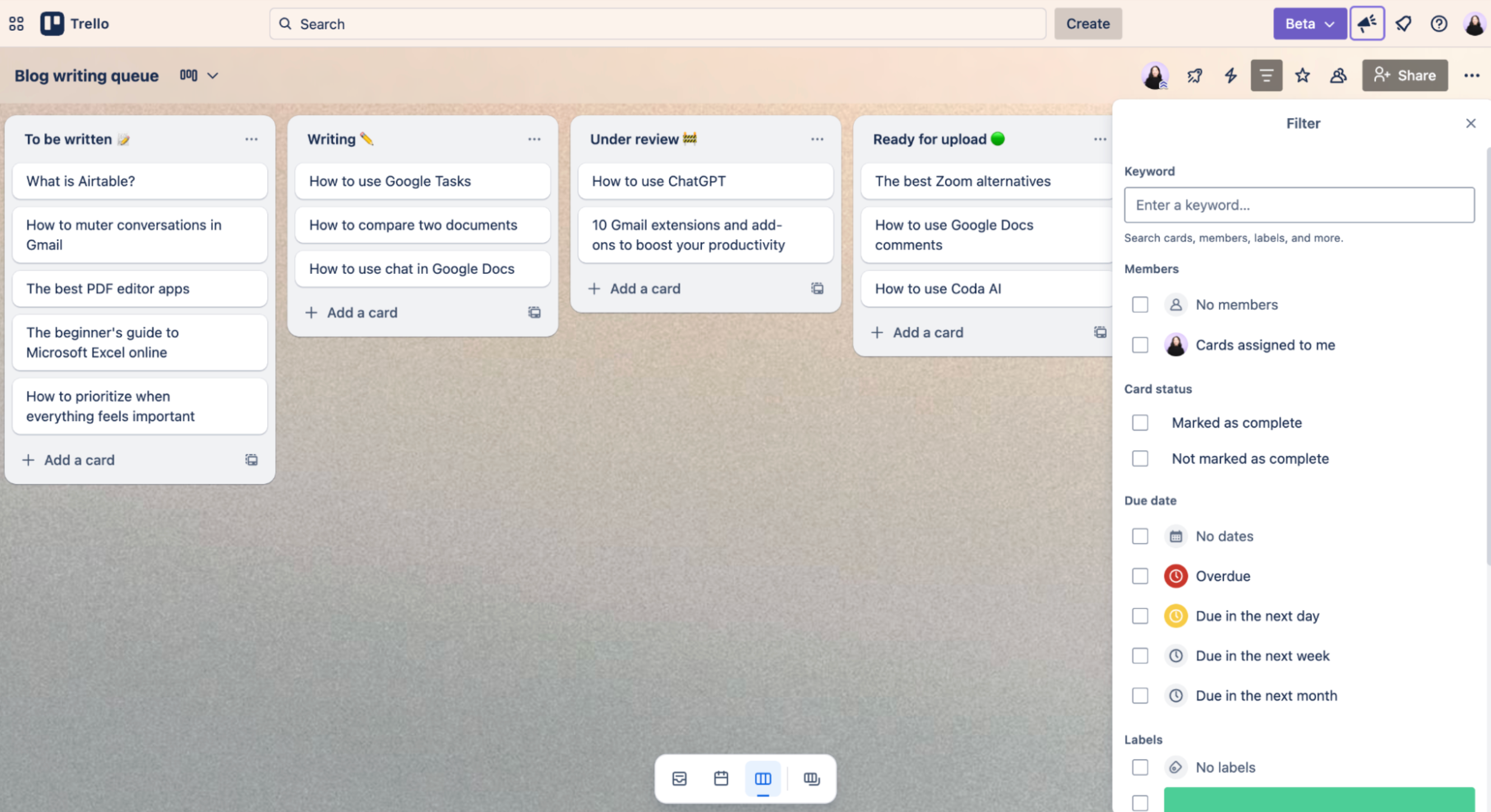
Trello lives and breathes Kanban, and it behaves exactly how you'd expect it to: there are lists across the top, cards in each list, and you drag them to the right as work progresses. Cards can carry checklists, due dates, attachments, labels, and member assignments, giving you enough structure to keep a team organized without any complex features that could throw a wrench into your workflows.
What keeps Trello from feeling like a CS major's freshman project is the built-in automation engine. You can create rules that trigger automatically when cards move between lists, set scheduled commands that update boards on a recurring basis, or add custom buttons that execute multi-step actions in a single click. This all exists within the board interface, without installing anything or writing a line of code.
Trello is happiest when the work is relatively contained: one team, one workflow, with a manageable number of cards. As projects grow in complexity, boards can feel cluttered, and the lack of cross-board reporting or deep task hierarchies becomes apparent. Timeline and calendar views also require a paid plan, which feels like an unnecessary gut punch at the free tier.
But if your needs are within Trello's wheelhouse, it remains one of the easiest ways to get a team organized—and you can always connect it with Zapier to expand its capabilities across your entire tech stack. Learn more about how to automate Trello.
Trello pricing: Free plan available; paid plans start at $5/user/month.
Best task management software for personal task management
Todoist (Web, iOS, Android)

Todoist pros:
Natural language processing for instant task creation
Clean, distraction-free interface
Productivity tracking
Todoist cons:
Limited project management depth for larger team workflows
Collaboration features are relatively basic compared to other tools on this list
Even simpler than the $2 corkscrew is a long, sharp knife, something to hit it with, and some patience (don't ask me how I know). The latter will still do the job, you'll just look like a caveman while doing it.
Todoist won't turn your workday Neanderthalithic, but it is a simple tool that excels in smaller, more personalized task management. It's not the flashiest option—and it likely won't replace your larger project management platform—but for capturing, organizing, and actually completing tasks, it's one of the most refined experiences on this list.
The natural language processing is the first thing people notice (I know I did). You can type, for example, "submit quarterly report every first Monday at 9 a.m," and Todoist will create the task, set the recurring schedule, parse the due date, and assign a priority level without you touching a date picker or dropdown. The NLP can handle dates, times, recurrence, and priority flags in plain English, so you can spend less time organizing and more time doing.
The interface deserves some credit, too. It's clean without being sparse, and it's consistent across every platform—useful for those who share joint task management between their desktop and mobile devices. The Karma system, which tracks completed tasks and streaks over time, is a subtle motivational layer, kind of like the Duolingo bird that squawks at you when you're about to lose your streak.
Where Todoist hits its ceiling is in the depth of its team and project management. You can share projects, assign tasks, and leave comments, but it's not built for complex multi-team workflows, detailed reporting, or the kind of structure that a growing organization eventually needs. Think of it less as a project management tool and more as a personal task list.
If you love the simplicity but would like to push the limits just a tad further, you can connect Todoist with Zapier to integrate your other tools and build a more capable project management system than you could do in the app alone. Learn more about how to automate Todoist.
Todoist pricing: Free plan available; paid plans start at $5/user/month.
Best task management software for software development teams
Jira (Web, iOS, Android)

Jira pros:
Agile support with sprint planning, backlog grooming, and velocity tracking
Highly customizable workflows
Deep integration with other Atlassian tools
Jira cons:
Steep learning curve for non-technical users
Teams may experience a lengthy setup without a dedicated Jira admin
You can enter some spaces and just feel what they're about. If I walk into a bar and there's dim lights, soothing music, and the bartender is wearing a suit, I know I'm paying $25 for a cocktail. Similarly, within seconds of playing around in Jira, you'll know: this is for developers.
Jira is unapologetically built for software development teams. The product has secondary use cases across marketing, design, and operations, but it really shines for teams desperately trying to get updates or new product features out on time.
Baked into the very helices of Jira's DNA is the Agile framework. Tasks live within epics, stories, and sprints in a structure that maps directly to how engineering teams usually plan and execute work. The backlog is where ideas and requests accumulate; sprint planning is where they get prioritized and committed to; and the active sprint board gives the team a real-time view of what's in progress, blocked, or complete.
Jira's customization capabilities are pretty robust. You can define custom issue types such as bugs, feature requests, tech debt, and incidents, each with its own fields, workflows, and transition rules. Teams can set up automations to handle repetitive coordination-like tasks such as transitioning issues, notifying key stakeholders, and escalating bugs. Additionally, Jira is part of the Atlassian ecosystem, so you can seamlessly integrate with Confluence, Bitbucket, and any other Atlassian-adjacent tools your team uses.
That said, just like Uncle Ben told Peter, with great power comes great complexity (right? Or was that a deleted scene?). For non-dev teams who mosey in expecting something like Trello or Asana, the experience can feel unnecessarily hostile and downright jarring. Not to mention, getting Jira fully up and running typically requires the assistance of someone who knows what they're doing.
But for software teams running Agile workflows, the investment pays off quickly. Not to mention, Jira integrates with Zapier so you can bridge your development workflow with the rest of your business. Learn more about automating Jira.
Jira pricing: Free plan available; paid plans start at $7.91/user/month.
Best task management software for documentation-heavy teams
Notion (Web, iOS, Android)

Notion pros:
Multiple task views, including board, list, calendar, and gallery
Tasks link directly to docs, wikis, and meeting notes within the same workspace
Notion AI
Notion cons:
No native time tracking or workload management views
Initial setup may be complex
If your team's work is deeply intertwined with documentation—as in, the why and how behind a task matters as much as the task itself—Notion handles that relationship in a way that's truly unique compared to other options on this list.
Tasks in Notion are database entries, which sounds much scarier than it actually is. In practice, it means a task can live as a card on a Kanban board, a row in a table, or an item on a calendar simultaneously, and users can link that same task to the product brief it came from, the meeting notes where it was discussed, and the internal page that explains why you're doing it.
Notion AI is a useful feature that can draft task descriptions from a brief prompt, summarize long comment threads into action items, and generate project briefs from a rough outline. For teams that rely heavily on text-based collaboration, having an AI assistant that understands the full workspace context can make your life that much easier.
That said, because you're building your own system rather than adopting a pre-configured one, getting to a functional task management setup requires some significant setup time. There's also no native time tracking or workload view, which are whiffs in tools of this category.
Overall, Notion rewards teams that invest in setting up their ecosystem; those who want to be fully productive on day one may want to look elsewhere. If you'd like to break the bounds of Notion and integrate it with the rest of your tools, connect it to Zapier. Learn more about automating Notion.
Notion pricing: Free plan available; paid plans start at $10/ member/month.
Automate your task management software with Zapier
Task management software can be a powerful tool to guide productivity, or it can be a disastrous whiteboard in a college bedroom that serves no real purpose. Whatever you choose has to match how your team works, thinks, and collaborates.
The common thread between all of these tools is that you can make them better with Zapier. Zapier lets you build end-to-end workflow automations that connect all of your tools, so you can get your to-do list done faster than you can check it off. And if you spend most of your time in an AI chatbot, you can use Zapier MCP to access your task management software and take action directly from your chat window.
Related reading:


